Why Lofrillo Deserves a Closer Look Before You Use It
Typography can make or break a project. You might have seen Lofrillo in a font gallery or read a glowing review, but before you download or purchase it, there are several things worth understanding. Lofrillo is a handcrafted font created by Creativeqube, and it has a distinct character that sets it apart from more generic typefaces. However, many people jump into using it without considering how it fits their specific needs, and that can lead to disappointment, wasted time, or a project that feels off.
In this article, I will walk through common mistakes people make when choosing, using, or evaluating Lofrillo. You will learn what to watch for, how to get the best results, and what questions to ask before committing to this typeface. The goal is to help you make an informed, confident decision.
What Exactly Is Lofrillo?
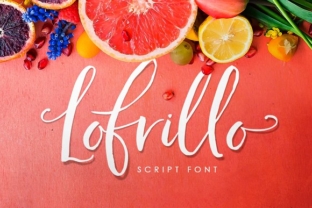
Lofrillo is a decorative, handcrafted font designed by the team at Creativeqube. It carries a warm, organic feel that mimics natural handwriting or brushwork. Unlike many digital fonts that feel mechanical, Lofrillo has irregular edges, varied stroke weights, and a slightly rough texture that gives it personality. It is not a neutral typeface. It is meant to stand out and communicate something personal, creative, or artisanal.
This makes it appealing for branding, invitations, logos, packaging, social media graphics, and other projects where you want a human touch. But its very strength is also where people run into trouble. Because Lofrillo is so distinctive, using it in the wrong context or without proper planning can undermine your message.
Mistake One: Assuming Lofrillo Works for Every Project
A common misunderstanding is that a beautiful font like Lofrillo can be used anywhere. After all, if it looks good on a poster, surely it will work for a business report, right? Not quite. Lofrillo was not designed for long-form reading or formal documents. Its irregular shapes and handcrafted nature make it harder to read in large blocks of text. Using it for an entire article, a product manual, or a corporate website body copy will likely frustrate readers and reduce comprehension.
How This Affects Your Results
When readers struggle to parse your text, they leave faster, they trust you less, and they may perceive your brand as unprofessional. Even if the font looks beautiful at first glance, poor readability erodes user experience. This is especially true for audiences who are older or have visual impairments.
A Better Approach
Reserve Lofrillo for headlines, short phrases, callouts, or decorative elements. Pair it with a clean, readable sans-serif or serif font for body text. For example, use Lofrillo for your main heading and a font like Open Sans or Lato for paragraphs. This gives you the best of both worlds: the personality of Lofrillo where it counts, and clarity where readers need it most.
Mistake Two: Ignoring the Licensing Details
Many people assume that when they buy a font once, they can use it everywhere. With Lofrillo, as with most quality handcrafted typefaces, the license is not always that simple. Creativeqube offers different licensing tiers depending on how you plan to use the font. Common oversights include using a personal license for commercial work, embedding the font in an app or website without the correct license, or sharing the font file with a client or colleague without permission.
How This Affects You
Using a font outside its license terms can lead to legal notices, fines, or forced removal of your work. For small business owners and freelancers, this can be devastating. It is not just about ethics—it is about protecting your business. The cost of a proper license is almost always less than the cost of a legal dispute or a redesign.
What to Check Before Buying
Before you purchase Lofrillo, read the license page carefully. Determine whether you need a desktop license, a web license, an app license, or something more specific. If you work with multiple clients, check whether the license covers client work or if each client needs their own license. When in doubt, contact Creativeqube directly. They are usually happy to clarify, and getting it right from the start saves you headaches later.
Mistake Three: Overlooking Font Pairing and Contrast
Lofrillo has a strong voice. It is informal, artistic, and slightly uneven. Pairing it with another strong or decorative font can quickly create visual chaos. I have seen projects where someone uses Lofrillo for a heading and another script or display font for subheadings, resulting in a cluttered, amateur look. The fonts compete instead of complementing each other.
Why This Happens
When you fall in love with a font, it is tempting to use it everywhere. You may also assume that more variety equals more creativity. But in typography, contrast is what creates hierarchy and readability. If every element is shouting, nothing stands out.
Practical Advice for Pairing
Choose one font that does the heavy lifting for display purposes—let that be Lofrillo—and then select a simple, neutral font for everything else. Good pairings include geometric sans-serifs like Montserrat or humanist typefaces like Source Sans Pro. The neutral font should be noticeably different in weight and structure from Lofrillo. Avoid pairing Lofrillo with other script or brush fonts. Instead, let it be the sole decorative element. Your design will look cleaner and more intentional.
Mistake Four: Not Testing the Font in Real Contexts
Another overlooked detail is how Lofrillo performs at different sizes and on different screens. A font that looks perfect in a preview at 72 points may become muddy, uneven, or hard to read at 18 points. Similarly, a font that prints beautifully may look different on a low-resolution screen or a mobile device.
How This Affects Quality and Satisfaction
If you design a logo or a website using Lofrillo without testing it at actual use sizes, you may end up with something that looks great in your design software but disappointing in reality. This is particularly common with handcrafted fonts because their irregular edges and subtle details can disappear or become exaggerated when scaled down.
Better Testing Practices
Before you commit to using Lofrillo in a project, create a few mockups at the sizes and resolutions you actually need. Test it on a phone screen, on a desktop monitor, and in a printed proof if possible. Look for readability, legibility, and overall impression. If the font loses its charm at smaller sizes, consider using a simplified version or a different style altogether. Many handcrafted fonts come with multiple weights or alternate glyphs, so explore those options as well.
Mistake Five: Forgetting About Audience Perception
Typography is not neutral. Every font sends a message. Lofrillo communicates creativity, warmth, and a handmade feel. That is perfect for a craft brand, a children's book, a wedding invitation, or a freelance designer's portfolio. But it may send the wrong message for a law firm, a financial service, or a medical practice. The audience may perceive the brand as unserious, unprofessional, or too casual.
Why This Matters for Entrepreneurs and Marketers
Your font choice shapes how people feel about your business before they even read a word. If you are targeting a conservative or formal audience, Lofrillo might work against you. If you are targeting creative industries or personal brands, it could be a huge asset. You need to match the font to the emotional tone of your message.
How to Avoid This Mistake
Before you finalize your choice, ask yourself: Does Lofrillo align with the values and expectations of the people I am trying to reach? If you are unsure, run a quick survey with a small group of people who match your target audience. Show them a design using Lofrillo and a design with a more neutral font, and ask for their impressions. The feedback will often surprise you.
Mistake Six: Downloading from Unverified Sources
Free font sites and unofficial download links can be tempting. But obtaining Lofrillo from anywhere other than the official Creativeqube page or a trusted distributor carries real risks. You might receive an incomplete file, a version with missing characters, a corrupted font, or even malware. You also have no guarantee that the font is the authentic handcrafted version. It could be a poor imitation that lacks the nuance of the original.
How This Affects Your Work and Safety
Using a corrupted or fake font can crash your design software, cause printing errors, or introduce security vulnerabilities. For professionals who rely on their tools, this is unacceptable. The time you save by downloading a free copy is quickly lost when you have to troubleshoot problems or redo work.
The Safe Path
Always purchase or download Lofrillo from official sources. Creativeqube maintains a store page with clear licensing, reliable files, and customer support. If the font is available through a reputable marketplace like MyFonts or Fontspring, those are also safe options. Paying for a legitimate copy is an investment in your own professionalism and peace of mind.
What to Check Before Making Your Final Decision
By now, you have a clearer picture of what Lofrillo is and what it is not. Before you commit, run through this short checklist:
- Purpose: Is Lofrillo suited for the primary role you need it to play? If it is for body text, reconsider. If it is for display, proceed.
- License: Do you have the correct license for your use case? Confirm before purchasing.
- Pairing: Have you chosen a neutral companion font? Avoid pairing Lofrillo with another decorative typeface.
- Testing: Have you previewed the font at actual use sizes and on relevant devices? Do not rely on previews alone.
- Audience: Does the font match the emotional tone your audience expects? Get feedback if needed.
- Source: Are you downloading from the official Creativeqube site or a reputable distributor? Skip free or suspicious sources.
Going through this list takes a few minutes, but it can save you from costly redesigns, legal issues, or a project that misses the mark.
Lofrillo is a genuinely beautiful font. When used thoughtfully, it can add warmth, character, and authenticity to your work. The key is to use it with intention, not just enthusiasm. Understand its strengths and limitations. Pair it wisely. Respect the license. Test thoroughly. And always keep your audience in mind.
Typography is a craft, and choosing the right font is part of that craft. Lofrillo has a place in many projects, but only when you approach it with the care it deserves. Take the time to get it right, and your designs will be stronger for it.