Ernst: A Handwritten Font That Deserves Better Than Bland Legibility
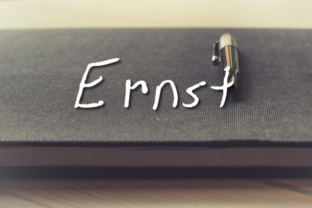
Not all handwritten fonts are created equal. Many of them lean so heavily on legibility that they lose the very personality that makes handwriting appealing. Enter Ernst — a high‑powered, energetic typeface designed to capture the authentic feel of a ballpoint pen without sacrificing charm. With nearly 1,500 glyphs, it supports far more than basic Latin: Cyrillic, Runic, Ogham, and a wide array of astronomical and astrological symbols are all included. That breadth means Ernst is not just another script font — it’s a versatile tool for creators, educators, and marketers who need a distinctive voice. But with great versatility comes the risk of misuse. Let’s walk through the most common pitfalls when choosing or using Ernst, and how to get the best from its raw energy.
The Mistake of Treating It Like Any Other Casual Script
When you first see Ernst, the ballpoint‑pen strokes feel familiar — like a quick note scribbled on a napkin. That’s intentional. But many people assume it’s interchangeable with dozens of other “handwritten” fonts. That assumption often leads to disappointment.
Ernst is not a clean, rounded brush script. It carries deliberate irregularities — slight slant variations, pressure shifts, and authentic pen lifts. If you drop it into a layout expecting the polite uniformity of a commercial script, the results can feel disjointed. The real mistake is ignoring its core design principle: it’s meant to look authentically handwritten, not beautifully perfect.
How to avoid this: Use Ernst where you want that raw, human energy — headlines, posters, social media graphics, or short call‑outs. Save perfectly polished scripts for formal invitations or corporate materials. Let Ernst be the rough‑edged voice in your design toolkit.
Overlooking the Massive Glyph Set
Nearly 1,500 glyphs. That number alone makes Ernst stand out, yet many people never look beyond the basic alphabet. The Cyrillic support is thorough, but even more surprising are the Runic and Ogham characters — two ancient writing systems rarely found in a modern ballpoint‑style font. On top of that, the astronomical and astrological symbols add a layer of specialty usefulness.
The mistake? Assuming you don’t need those extras — until you do. A designer working on a project about Norse mythology might suddenly need a Runic character. A small business owner creating a line of zodiac‑themed products could use those astrological symbols without hunting down a separate icon font.
Practical advice: Before you buy or download Ernst, scan its full character map. Even if you don’t plan to use Runes or Ogham now, knowing they’re there can save you hours later. For educators or presenters covering ancient languages, this font becomes a single‑source solution instead of mixing typefaces.
Assuming It Works as a Body Text Font
Ernst has excellent legibility for a handwritten face, but that doesn’t mean it’s suitable for paragraphs. The uneven strokes and varied letter widths that give it character can fatigue the eye when used for long reading. A common mistake is using Ernst for blog posts, long captions, or product descriptions — areas where readability should be the priority.
The result is a page that feels cluttered or hard to follow, especially on screens with smaller viewports. Even worse, the authentic “pen” quality can make serious content seem dismissive or too casual.
Better approach: Reserve Ernst for short bursts of text — headlines, pull quotes, button labels, or a few lines of emphasis. Pair it with a clean sans‑serif body font (like Lato, Open Sans, or Montserrat) to create contrast. Long‑form readers will thank you, and Ernst’s personality will shine where it matters most.
Ignoring Kerning and Spacing Adjustments
Handwritten fonts naturally have irregular spacing — it’s part of their authenticity. But that doesn’t mean you should accept default settings without adjustment. Many users skip the step of manually tweaking tracking and kerning, especially in software that doesn’t auto‑optimise for script fonts.
When you leave spacing untouched, tight letters can look cramped, while wide loops create distracting gaps. That uneven rhythm undercuts the professional finish of an otherwise strong design.
What to check: Open the font in your design tool (Canva, Adobe Illustrator, or even Microsoft Word) and adjust letter spacing until the words look like a natural flow of handwriting — not a machine‑spaced sequence. For short headlines, opt for slightly tighter tracking to mimic fast pen strokes. For display titles, a touch of negative kerning between pairs like “r” and “n” can prevent them from looking like an “m.”
Not Verifying Language Support Before Starting a Project
Ernst includes impressive multi‑language support, but many users assume that “supports Cyrillic” means every Cyrillic character is present. The same goes for Runic and Ogham. The 1,500‑glyph count is generous, but some rare variations or contextual alternates may not be included.
If you’re designing a bilingual publication or a historical reference sheet, and you discover halfway through that a specific Runic character is missing, you’ll face a scramble to substitute or redraw it. That mistake costs time and consistency.
How to avoid regret: Download the font specimen or open the typeface in a character map application before committing. Test your most important characters — especially if your project involves non‑Latin scripts or obscure symbols. For most common linguistic needs (Latin, Cyrillic, and common symbols), Ernst is fully equipped. But verifying early keeps your workflow smooth.
Misunderstanding the “Authentic Feel” vs. Legibility Tradeoff
Some users complain that Ernst isn’t as readable as their go‑to handwriting font. That’s like criticising a sports car for not having enough cargo space. The font prioritises energy, character, and the imperfect flow of a real ballpoint pen over ultra‑clean, uniform letter shapes. The designers intentionally avoided “bland lettershapes focused solely on legibility.” That’s a feature, not a bug.
The mistake is expecting Ernst to behave like a textbook font. When you push it into a role that demands strict uniformity, it disappoints. But when you embrace its quirks — the occasional tight loop, the slightly tilted “e,” the natural ascender variation — the results feel alive.
Solution: For any project where personality matters more than machine precision (think creative branding, music posters, event flyers, hand‑lettered‑style headers), Ernst is an excellent choice. For formal corporate reports, dense informational charts, or legal fine print, step back to a neutral typeface.
Forgetting to Test in Context
One of the biggest oversights happens before purchase or download: people look at the font only in isolation. They see beautiful specimen pages with carefully chosen words. But real‑world usage is different. A font that looks wonderful in the foundry’s sample may fall apart when used in your exact layout — at your size, on your background, with your specific words.
What to check: If possible, try a trial version of Ernst or use a preview tool that lets you paste your own text. Test it at the size you plan to use. Change the background color. Add a bold or italic style if available. Watch how it behaves in all‑caps versus sentence case. That small test can save you from buying a font that doesn’t fit your project’s needs.
Practical Summary: Getting the Most from Ernst
- Use it for display purposes — headlines, logos, social media posts, short promotional text.
- Pair it with a neutral sans serif for body copy to balance the energetic handwriting.
- Explore the full glyph set — you may discover Runic or astrological characters that simplify your design.
- Manually tweak kerning and tracking to achieve a natural, not mechanical, rhythm.
- Verify your needed characters early, especially if working with Cyrillic, Runic, or Ogham content.
- Embrace the imperfect pen‑and‑paper feel — that’s exactly what makes Ernst stand out from sanitised scripts.
Ernst is a font that rewards thoughtful use. It’s not a back‑up script for when you’re out of ideas. It’s a deliberate, energetic choice that says “this was written by hand, with purpose and speed.” When you respect its character, understand its broad linguistic reach, and deploy it where its natural voice belongs, the results feel authentic, memorable, and refreshingly human. Avoid the common traps of expecting it to be something else, and you’ll find a typeface as versatile as it is distinctive.