Tropical Vibes: A Hand-Painted Feminine Dry Brush Font for Invitations and Branding
If you’ve ever designed an invitation or worked on branding for a coastal-inspired business, you know how quickly a project can feel flat with the wrong typeface. A script that’s too formal can make a beach wedding feel stiff, while a generic sans serif often lacks the warmth you want. That’s where Tropical Vibes steps in—a feminine dry brush font that was painted from scratch by hand. Its raw, textured strokes carry a sense of handmade care that digital-first fonts often miss. But as with any specialty font, using it effectively requires more than just downloading and typing. Many people make avoidable mistakes that reduce the impact of their designs. Let’s walk through the common pitfalls and how to steer clear of them so you get the most out of this handcrafted typeface.
What Tropical Vibes Offers (and What It Doesn’t)
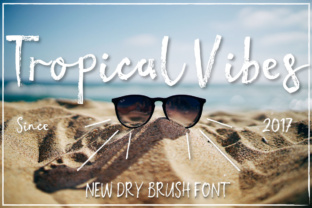
Tropical Vibes is a dry brush font with a distinctly feminine feel. The letters have irregular edges, varying stroke widths, and a loose, organic quality—think calligraphy with a brush dipped in ink rather than a pen. This makes it ideal for projects that need personality: wedding invitations, logo headers, social media graphics, product labels, or any branding that aims for a laid-back yet elegant vibe. However, that same handmade look introduces limitations. The font is not designed for body text or small sizes. The rough strokes can blur together below 18–24 points, and the irregular baseline can make long paragraphs hard to read. Recognizing this early prevents frustration later.
Common Mistake: Using It for Everything
One of the most frequent errors I see is people trying to use Tropical Vibes as their only font across an entire project. They fall in love with the aesthetic and set everything—headlines, subheads, body copy, captions—in the same dry brush style. The result is chaotic. Readers struggle to distinguish hierarchy, and the font’s charm becomes visual noise. Instead, treat Tropical Vibes as a display font. Use it for the main headline, maybe a subhead or a highlight word, and pair it with a clean, neutral font (like a simple sans serif or a light serif) for the rest of the text. This contrast makes the brush lettering stand out without overwhelming the design.
Overlooking Legibility in Specific Applications
Because Tropical Vibes is hand-painted, some letterforms can be ambiguous. An “a” might look like an “o” at a glance; an “f” might blend into the next letter. When you’re designing a wedding invitation, the last thing you want is a guest misreading the venue name or the time. A simple fix is to test the font at the actual final size you plan to use. Print a sample, step back, and ask someone else to read it. If they hesitate, consider increasing the point size, adding more letter spacing, or using a different font for critical details like dates and addresses. Many professional designers keep a second, extremely legible font on hand for the small print.
Example: The Invitation That Confused the Date
I once saw a beautifully designed bridal shower invite where “August 15” was set entirely in a dry brush font similar to Tropical Vibes. The “15” looked like “19” to several guests who arrived a day late. The designer hadn’t tested the legibility of the numbers at the intended size. With a font like Tropical Vibes, test the numerals separately—they often have the same brushy quirks as letters. If the date isn’t clear, use a complementary clean font for numbers and keep Tropical Vibes for the names or theme words.
Ignoring Contrast with Background and Color
Another overlooked detail is the interaction between the font’s texture and the background. Because Tropical Vibes has thin, tapered strokes and thicker brush marks, it can get lost on busy backgrounds. A dark, hand-painted font over a tropical leaf pattern might look muddy rather than vibrant. Similarly, light colors (like a soft pink or yellow) can make the brush strokes appear faint and fragile. The best practice is to place Tropical Vibes on a solid, high-contrast background—white, cream, black, or a deep solid hue. If you want a patterned backdrop, keep the pattern very subtle and enlarge the font size. Test the combination in both digital and print form; what looks good on screen may become illegible when printed on textured paper.
Misunderstanding Licensing and Commercial Use
Many handcrafted fonts like Tropical Vibes come with specific licensing terms, especially if you download them from independent foundries or marketplaces. A common mistake is assuming that purchasing a personal license covers commercial work—like using the font in a logo for a client or on products you sell. Always check the license before buying. Some fonts require a separate commercial license for branding assets, merchandise, or app interfaces. Overlooking this can lead to legal headaches or having to change your design last minute. If you’re a freelancer or small business owner, factor the license cost into your project budget. It’s usually a small expense that protects you and respects the work of the type designer.
Practical Check Before Downloading
Before you click “buy,” read the product description carefully. Look for keywords like “personal use only,” “commercial license included,” or “extended license required for logos.” If it’s unclear, contact the seller. Most foundries are happy to clarify. I also recommend downloading the free trial version (if available) and testing how it renders in your design software. This confirms that the font behaves as expected before you invest.
Pairing Issues: When Tropical Vibes Clashes with Other Typefaces
Even if you use Tropical Vibes only for headlines, pairing it with the wrong complementary font can create a disjointed look. A very geometric, modern sans serif might feel too cold next to the organic brush strokes. A highly decorative serif could compete for attention. The best pairings are simple, neutral fonts with medium weight and moderate contrast. Think subtle fonts like Montserrat, Lato, or even a clean script like Alex Brush (if you want a softer pairing). The goal is to let Tropical Vibes be the star while giving the rest of the text a supporting role that doesn’t distract. Test a few combinations; if the overall design feels busy or unbalanced, simplify.
Forgetting the Font’s Handmade Quirks in Digital Workflows
Since Tropical Vibes was painted by hand, the glyphs have natural inconsistencies. This is part of the charm, but it can cause issues in certain software. For example, automatic kerning in programs like Microsoft Word may misalign letters, leading to awkward gaps or collisions. If you’re using Adobe Illustrator or InDesign, you can manually adjust kerning for key word pairs. In simpler software, increase the tracking (letter spacing) slightly to give each letter breathing room. Another quirk: ligatures and alternate characters might not appear unless you enable OpenType features. Learn how to access these in your design tool—they can add beautiful variations that make your text feel even more custom.
How to Avoid Costly Rework
The most expensive mistake isn’t the font purchase—it’s the time lost redoing a design after realizing the font doesn’t work. To prevent this, create a small test project before committing. Type a sample phrase that includes all the letters you’ll need (e.g., “We joyfully invite you to celebrate at 4 PM”). Print it on the paper you plan to use, or view it in the exact digital context (social media mockup, website header, etc.). Check that the font supports the characters you need—does it have numerals, punctuation, accented letters? Tropical Vibes may have limited character sets, so verify this early, especially if you’re designing for a language that requires diacritics.
Better Approach: Start with a “Font Sandwich” Strategy
Many experienced designers use what I call the “font sandwich” approach: pick one hero display font (like Tropical Vibes), one clean body font (like a simple slab serif or sans), and one accent font (maybe a subtle script or geometric) if needed. Keep the hero font to no more than 20–30% of the total text. This ensures the handmade aesthetic has impact without dominating readability. For invitations, the hero font might be used for the couple’s names; the body font for details; and the accent font for a single word like “together” or “celebrate.”
Final Thoughts on Making Tropical Vibes Work for You
Tropical Vibes is a delightful, hand-painted font that can elevate your invitations and branding—if you use it with intention. The main mistakes people make come from expecting it to behave like a standard, all-purpose typeface. By understanding its strengths (warmth, femininity, handmade texture) and its limits (legibility at small sizes, need for contrast and careful pairing), you can avoid the frustration of a design that falls flat. Test everything. Pair it thoughtfully. Respect the licensing. And let the natural brush strokes shine where they belong: in the spotlight, with plenty of breathing room around them. Your next project could be the one that finally captures that tropical vibe you’ve been after, without the headaches.